顯示包含「Zotero」標籤的文章。顯示所有文章

2026年9月10日星期四

Zotero 10 is out now

Zotero is a free, open-source reference management software that helps you collect, organize, annotate, cite, and share research materials from your laptop, phone and tablet. 

Download Zotero 10 now. 


  • What's new to me:  

Zotero 10

We’re excited to announce Zotero 10, which adds a host of powerful new features for searching and managing your library, a major improvement to Read Aloud, and a new Reading Mode for PDFs.

Advanced search is now available via a filter button in the quick-search bar, and it opens right above the items list in the main window. You can filter any view, including collections or saved searches, and immediately work with the results.
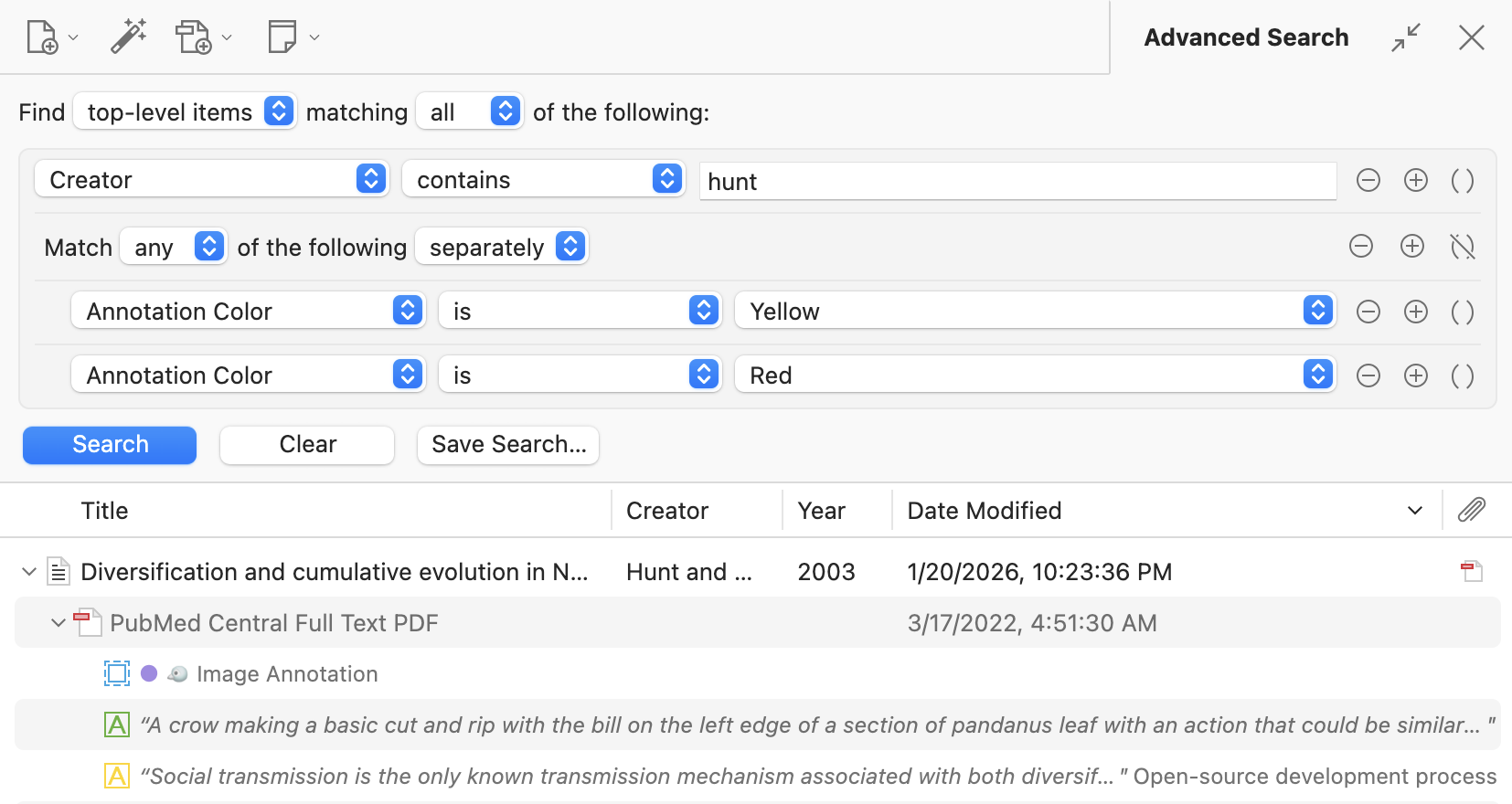
Searches are now much more powerful, with support for nested condition groups and automatic mapping of conditions across levels of the hierarchy. It’s now trivial to, say, search for top-level items with a given author AND (a descendant annotation that is either yellow OR red). For any search, you pick what result level you want to find (e.g., “top-level items” or “annotations”), and the search conditions you use will automatically be mapped to that result level. So you can find top-level items even if you’re searching for annotation content two levels below or find all annotations underneath top-level items with a given tag. Searching for attachments within collections or combining conditions across the hierarchy used to require chaining multiple saved searches, and those searches can now be represented easily in a single search.

Clicking the advanced-search button with something entered into the quick-search bar will automatically populate an equivalent advanced search. Since the advanced-search pane persists when you click between collections, this also addresses the longstanding request to be able to pin searches when moving between collections.

Finally, we’ve added various new search conditions for annotations (e.g., “Annotation Color”) and counts (e.g., “# of Notes”) as well as “is empty” and “is not empty” operators.


Evangel Seminary training video:  

中文格式輸入介紹

2026年5月11日星期一

Zotero 9 is out now

 Download Zotero 9 now.

What's new to me: 

  • Read aloud function---but it works on PDFs, EPUBs, and webpage snapshots only, not your notes and others. You can pause and skip to the next paragraph. This is not bad at all! 
  • Using less memory 

2026年3月29日星期日

Caution for those using 2nd Ed. SBL Handbook Note style in Zotero

 pls see the discussion in the Forum

2nd Ed. SBL Handbook Note style no longer has the place in the citation

As in the title, it's now incorrect - the place has completely disappeared from both the notes and bibliography in all of the Item Types that I'm currently using (book, thesis, journal article, blogpost, conference paper) so I'd assume that would be the same with the rest too
  • That's correct SBL. Chicago removed the place in the 18th edition and SBL had a blogpost in December that they are following suit.

 ...


*****

If you use SBL style previously in Zotero and don't want the update one which removed all the publishing places, you can get the "legacy edition" of the SBL 2.0 style here.


For those who uses HRW Chinese and English Citation 3rd edition (full note) (which works on 《學術研究與寫作:聖經、神學與教牧學研究手冊》), this is not affected. See here.   

2025年6月5日星期四

The official Zotero for Android is finally available!!

a free and open-source citation management tool that helps users collect, organize, annotate, cite, and share research:  


 Zotero for Android


  • It has been on iOS for a long time: 


Official apps are available for iOS and Android:

The mobile version of the Zotero web library also allows you to access and edit your Zotero library on your tablet or mobile phone.


2024年9月6日星期五

Zotero 7 released!

 source

Zotero 7: Zotero, redesigned

We’re thrilled to announce the release of Zotero 7, the biggest update in Zotero’s 18-year history and a major leap forward in design, performance, and functionality.

A Major Redesign

Zotero 7 introduces a beautiful, modern design that will still feel familiar to long-time Zotero users.

Screenshot of Zotero library

Zotero for Mobile--iOS available


2017年9月15日星期五

2017 BibleWorks, Logos及Zotero入門工作坊


日期: 15/9/2017()
時間: 7:30-9:00pm
地點: 播道神學院59(課室59215)
對象: 本院日夜校新生,有興趣的播道會教牧同工
負責: 譚志超博士 (本院聖經科副教授兼圖書館主任)

內容:
介紹現時學界通用最新的兩個神學/聖經研究軟件, BibleWorks 10Logos 7,透過示範了解如何運用來做神學研究。當晚亦會簡介另一免費的書目管理軟件Zotero,該軟件主要幫助神學生/教牧管理所搜資料,並輸出正規的註腳及書目格式

: 如同學已安裝有關的軟件帶備自的手提電腦出席。

2016年9月1日星期四

2016 BibleWorks, Logos及Zotero入門工作坊


日期: 9/9/2016()
時間: 7:30-9:00pm
地點: 播道神學院59(課室59216)
對象: 本院日夜校新生,有興趣的播道會教牧同工
負責: 譚志超博士 (本院聖經科副教授兼圖書館主任)

內容:
介紹現時學界通用最新的兩個神學/聖經研究軟件, BibleWorks 10Logos 7,透過示範了解如何運用來做神學研究。當晚亦會簡介另一免費的書目管理軟件Zotero,該軟件主要幫助神學生/教牧管理所搜資料,並輸出正規的註腳及書目格式

: 如同學已安裝有關的軟件帶備自的手提電腦出席。

Zotero 10 is out now

Zotero is a free, open-source reference management software that helps you collect, organize, annotate, cite, and share research materials f...